


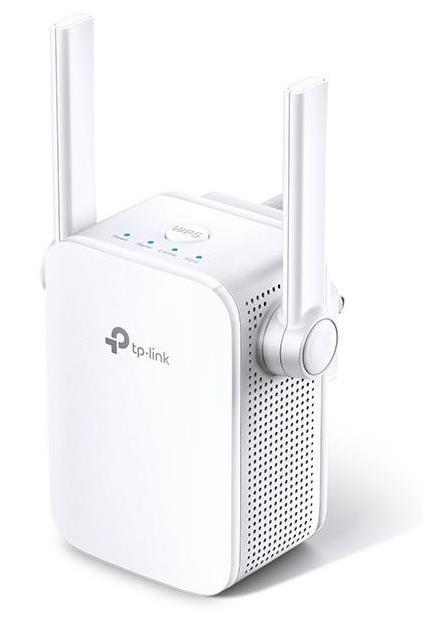
WiFi range extenders, also known as WiFi boosters or WiFi repeaters, are devices designed to extend the coverage area of your existing WiFi network. Here’s what you need to know about WiFi range extenders:
- Functionality: WiFi range extenders receive the existing WiFi signal from your router and rebroadcast it to extend the coverage area. They can help eliminate WiFi dead zones and improve signal strength in areas where the signal is weak.
- Setup: Setting up a WiFi range extender typically involves:
- Plugging in the extender in an area where you can still receive a good WiFi signal from your router.
- Connecting to the extender’s network (usually via a web interface) and configuring it to connect to your existing WiFi network.
- Choosing a suitable location for optimal coverage where the extender can still receive a strong signal from the router.
- Types of Range Extenders:
- Single Band: Operates on the 2.4 GHz frequency band and can extend the range of older WiFi devices.
- Dual Band: Operates on both 2.4 GHz and 5 GHz bands, providing better performance and less interference in crowded WiFi environments.
- Mesh WiFi Systems: While not exactly range extenders, mesh systems like Google WiFi, Eero, or Orbi consist of multiple nodes that work together to provide seamless WiFi coverage throughout your home.
- Considerations When Choosing a Range Extender:
- Compatibility: Ensure compatibility with your existing WiFi router in terms of WiFi standards (e.g., 802.11ac, 802.11n).
- Speed and Coverage: Choose an extender with adequate speed and coverage range to meet your needs. Pay attention to the specifications such as maximum data transfer rates.
- Ease of Setup: Look for extenders that offer easy setup processes, possibly through mobile apps or straightforward web interfaces.
- Placement: Proper placement of the WiFi range extender is crucial for optimal performance:
- Place it within the range of your existing WiFi router but close enough to the areas where you need better coverage.
- Avoid placing it too far from the router or in areas where the WiFi signal is very weak, as this can diminish performance.
- Performance Considerations: While range extenders can extend WiFi coverage, they can also reduce overall network bandwidth. This is because they rebroadcast the signal, effectively halving the available bandwidth for devices connected through the extender.
- Alternatives: Depending on your home’s layout and needs, consider alternatives like powerline adapters (which use electrical wiring to extend network coverage) or upgrading to a mesh WiFi system for more seamless coverage.
WiFi range extenders are useful for improving WiFi coverage in larger homes or areas with WiFi dead zones. If you have specific questions about WiFi range extenders or need further assistance, feel free to ask!




Reviews
There are no reviews yet.